Garmin Drive™
GarminAuto & Vehicles
3.84.54K Reviews
- Version
- 4.29.38
- Installs
- 1.00M
- Age Rating
- Everyone
Screenshots
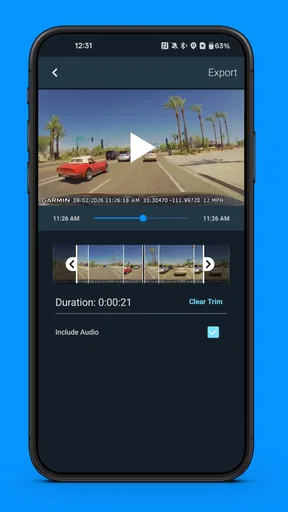
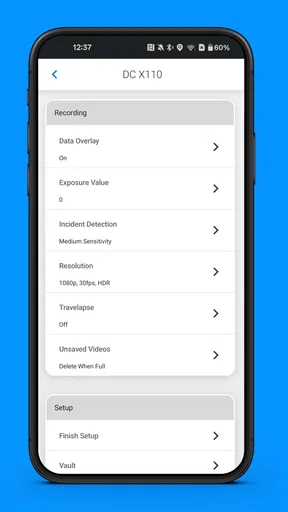
Our Review of Garmin Drive™
 Analysis by Appyee
I spend a lot of time testing driving tools, and Garmin Drive™ stands out because it is not trying to be a complete replacement for every navigation app on your phone. It is a companion app for Garmin’s driving ecosystem, aimed at making trips easier to manage when you already use compatible Garmin equipment. That distinction matters: the app can be useful on its own in some situations, but its strongest value appears when it fits into the way you already drive.
Garmin lists it as a free app in the Auto & Vehicles category, with an Everyone content rating. It comes from Garmin, the company best known for dedicated navigation and vehicle devices. The app has passed the one-million-install mark and holds an average rating of 3.9 from roughly twenty-four thousand ratings, alongside about four and a half thousand written reviews. Those figures suggest a product with a substantial user base, but also one that does not satisfy every driver equally.
My overall impression is that Garmin Drive is most convincing as a practical bridge between a Garmin device and a smartphone. It can reduce the amount of handling needed during a journey, keep driving information closer at hand, and make a Garmin-based setup feel less isolated from the rest of your phone. If you are looking for a free, independent navigation app with the broadest possible phone-first experience, I would look elsewhere. If you already rely on Garmin hardware, the decision is much easier.
How Garmin Drive fits into a real driving routine
The first thing I would do after installing it is think about the role I want it to play. This is not an app I would casually open before every trip without considering the rest of my setup. Garmin’s product family includes dedicated devices and vehicle-focused accessories, so the experience depends heavily on whether the app is being used as part of that environment rather than as a standalone replacement for familiar phone navigation.
That makes the app particularly relevant for drivers who want their phone and Garmin equipment to work together. Instead of treating the dedicated navigator and the phone as separate tools, Garmin Drive gives the mobile side of the setup a more active role. In everyday use, that can mean less switching between screens and fewer moments where I need to reach for another app to handle a related driving task.
A realistic example would be a weekday drive where I set up the route before leaving, place the phone in its normal mount, and let the Garmin device remain the main navigation screen. The phone is then available for the connected parts of the experience rather than becoming another large display competing for attention. On a longer trip, that separation is useful because it keeps the driver-facing information focused while the companion functions remain nearby.
I also see value for someone who has moved from occasional phone navigation to a dedicated Garmin unit. The transition can feel awkward when the device appears to operate alone. A companion app makes the overall arrangement feel more familiar, because the phone remains part of the workflow. That is a small design advantage, but it can make a difference during the first few weeks of using dedicated navigation hardware.
What the free price really means
The clearest financial advantage is simple: Garmin Drive is free to install and use as an app. That makes it easy to try without committing money to the mobile software itself. For someone who already owns compatible Garmin equipment, this is a sensible way to add phone-based support without paying a second app charge.
However, I would not interpret “free” as meaning that every part of a Garmin driving setup costs nothing. The app’s value is closely connected to the Garmin hardware and services a driver already has. If you do not own the relevant equipment, the app may not deliver the same usefulness as a standalone navigation alternative. The important distinction is between free access to the app and the wider cost of building a Garmin-based driving system.
That distinction makes the value equation fairly personal. An existing Garmin owner can treat the app as an included companion that improves the usefulness of equipment already purchased. A driver starting from scratch should judge the total setup rather than the app’s download price alone. I appreciate that the mobile entry point is free, but I would still make the hardware decision separately.
There is also no reason to install it purely because it costs nothing. Free software can still add clutter, battery use, setup time, or another interface to learn. I would install Garmin Drive when it solves a specific problem in my driving routine, especially connection between a phone and Garmin equipment. Without that need, a familiar navigation app may be the simpler choice.
Where the app delivers practical value
The strongest benefit is integration. Garmin Drive is designed around the idea that a phone can support a dedicated driving device rather than replace it. That can be more comfortable for drivers who prefer a purpose-built screen, physical placement, or Garmin’s style of navigation, while still wanting the convenience of a smartphone companion.
Another useful point is continuity. When a driver uses one ecosystem for navigation and vehicle-related information, there are fewer separate tools to remember. I find that especially helpful before leaving home: instead of deciding which app should handle each part of the journey, I can keep the Garmin setup as the central reference and use the phone as its supporting layer.
The app also makes sense for households that share a vehicle. If one person prefers a Garmin navigator and another normally uses a phone, a companion application can make the arrangement less rigid. The Garmin device remains available for the driver who wants it, while the phone-based side of the system is not completely disconnected from daily habits.
For frequent travelers, the benefit is less about a single dramatic feature and more about reducing friction. A driver who repeatedly connects a phone, prepares a route, and checks trip information may appreciate having those actions organized around the Garmin setup. Small reductions in setup time become more noticeable when repeated across many commutes.
Three details that affect the experience more than the store summary suggests
First, I would test the connection before relying on the app for an important journey. Companion apps are only helpful when the phone, the Garmin device, and the vehicle environment cooperate reliably. Pairing at home, checking that the expected information appears, and confirming the phone is positioned safely can prevent a frustrating start to a trip. This is a simple step, but it is more valuable than discovering a connection problem in a crowded car park.
Second, I would avoid treating the phone as a second navigation screen unless there is a clear reason to do so. The point of a Garmin-centered setup is often to reduce distraction, not multiply it. Keeping the phone in a stable mount and using the Garmin display as the main visual reference creates a cleaner workflow. The app is more useful when it supports the driving device instead of competing with it.
Third, I would judge the app after a complete routine rather than after a quick launch. The important test is not whether it opens; it is whether it makes departure, route preparation, and in-car use feel easier. Try it on a normal commute, then on a longer drive with more planning involved. That reveals whether the integration genuinely helps or simply adds another step.
A fourth trade-off is worth noting for people who change cars or devices often. A tightly connected ecosystem can feel convenient when everything matches, but less convenient when the hardware changes. Before making Garmin Drive central to your routine, consider whether you expect to keep using Garmin equipment for the foreseeable future. The app is most valuable when the surrounding setup is stable.
Limitations I noticed in the overall proposition
The biggest limitation is that the app is not equally compelling for every phone user. Someone who already has a preferred navigation application may see little reason to change, particularly if that person does not use Garmin hardware. Familiar alternatives often win on habit alone: they are already installed, already configured, and already part of the driver’s daily routine.
The second limitation is dependency on context. A companion app cannot be judged entirely apart from the device it supports. If the Garmin equipment is inconveniently mounted, difficult to update, or not suited to your driving style, the mobile app will not solve those broader issues. It can improve a compatible setup, but it cannot turn an unsuitable setup into a perfect one.
I would also be cautious about expecting the phone application to offer the same kind of experience as a large, mature phone-first navigation platform. Those alternatives are often designed around quick address searches, familiar map interactions, and broad compatibility with different vehicles. Garmin Drive has a more specific purpose, and that focus is a strength for Garmin users but a limitation for everyone else.
The rating of 3.9 is consistent with that mixed picture. It is not a warning that the app is unusable, but it does suggest that individual experiences vary. Connection behavior, device compatibility, expectations, and preferred navigation habits can all influence whether a driver considers the app essential or unnecessary.
Another practical concern is learning where each task belongs. When a phone and a dedicated navigator share responsibilities, it may take a little time to understand which screen should be used for route planning, which one should be watched while driving, and which actions are better handled before departure. I would not call that a serious flaw, but it is a real adjustment for anyone moving from a single phone app.
Who will get the most value from it?
I would recommend Garmin Drive first to people who already own a compatible Garmin navigation setup and want their phone involved in the experience. For these drivers, the app can make existing equipment feel more connected and less separate from the rest of their digital routine. The free price strengthens that recommendation because there is no mobile purchase barrier to testing the fit.
It is also a good candidate for drivers who prefer dedicated navigation hardware but still want the convenience of smartphone support. Some people do not like relying on a phone for every driving task, whether because they prefer a separate screen or simply want the phone to remain available for other needs. Garmin Drive respects that preference rather than forcing the phone to become the only center of attention.
Drivers who make repeated trips may benefit more than people who navigate only a few times each month. Regular commuters notice workflow improvements quickly, especially when the app helps maintain a consistent relationship between the phone and Garmin device. For occasional users, the setup effort may outweigh the convenience unless the Garmin equipment is already part of the vehicle.
I would skip it if I wanted a completely independent navigation experience with no interest in Garmin hardware. In that situation, a mainstream phone navigation app is likely to feel more direct. I would also skip it if I dislike managing paired devices or prefer to keep my driving tools limited to one application. Adding a companion layer is worthwhile only when it removes more friction than it creates.
It may not be the right fit for someone who frequently borrows cars, switches between different navigation systems, or wants a single app that behaves consistently across every vehicle. Garmin Drive makes more sense when the driver has a clear, repeatable setup. The more temporary the vehicle arrangement, the less likely the ecosystem benefits are to outweigh the extra configuration.
Software details and long-term confidence
Garmin released the app on October 17, 2017, so it is not a new experiment. Its current version is 4.28.14, and it supports Android beginning with version 9. That gives Android users on reasonably recent phones a clear starting point for compatibility, although I would still check the phone and Garmin device combination before planning an important trip.
The long presence in the app market is reassuring because it indicates that Garmin has continued maintaining the product rather than abandoning the companion concept. At the same time, an established app can accumulate layers of behavior that are not immediately obvious to a new user. I would allow time for setup and testing instead of expecting instant fluency.
The Everyone rating is appropriate for a driving companion intended for general audiences, but it should not be confused with permission to use the app carelessly behind the wheel. I would prepare routes and adjust settings while parked, then keep interaction to a minimum during movement. The safest companion app is the one that requires the least attention once the journey begins.
My buy-or-skip verdict
For me, Garmin Drive is worth installing when Garmin hardware is already part of the car. The free app adds value by connecting the phone to that ecosystem, and the combination can make regular driving feel more organized. I would not describe it as a universal navigation winner, but I would describe it as a sensible companion for the audience Garmin is targeting.
If you are starting with no Garmin equipment and simply want directions on a phone, I would skip it and choose a phone-first alternative that matches your habits. That is not a criticism of Garmin Drive; it is a matter of choosing the right tool for the job. The app’s focused design is useful precisely because it does not try to serve every possible driving situation in the same way.
My recommendation is therefore conditional but positive: install it if you own compatible Garmin equipment, test the connection at home, and evaluate it during both a short commute and a longer planned trip. If it reduces switching and makes your setup easier, it earns its place. If it only duplicates what your current navigation app already does, the fact that it is free is not enough reason to keep it.
Garmin Drive is best understood as a free connector for a Garmin-centered driving routine, not as an automatic replacement for every navigation app. That makes its value clear: existing Garmin users have the most to gain, while phone-only drivers should think carefully before adding another layer to their journeys.
Privacy and Permissions
See what permissions an app requests and how it handles your data.
- Contacts
- read your contacts
- Location
- approximate location (network-based), precise location (GPS and network-based)
- SMS
- send SMS messages
- Phone
- directly call phone numbers, read call log, read phone status and identity
- Photos/Media/Files
- read the contents of your USB storage, modify or delete the contents of your USB storage
- Storage
- read the contents of your USB storage, modify or delete the contents of your USB storage
- Camera
- take pictures and videos
- Microphone
- record audio
- Wi-Fi connection information
- view Wi-Fi connections
- Device ID & call information
- read phone status and identity
- Other
- view network connections, pair with Bluetooth devices, access Bluetooth settings, change network connectivity, allow Wi-Fi Multicast reception, connect and disconnect from Wi-Fi, full network access, change your audio settings, run at startup, draw over other apps, prevent device from sleeping
Verdict
Strengths of Garmin Drive™
- Clear turn-by-turn guidance with helpful lane information.
- Speed-limit alerts can encourage safer, more attentive driving.
- Saved locations make frequent destinations quick to access.
- Works well with compatible Garmin navigation devices.
- Useful fuel-price and parking information in supported regions.
Limitations of Garmin Drive™
- Some features require a compatible Garmin device or subscription.
- Map coverage and traffic data vary by country and region.
- Location access can noticeably increase battery consumption.
- The interface may feel dated compared with newer navigation apps.
- Bluetooth pairing issues may occur with certain phones or vehicles.
Other Releases by Garmin
View All
Navionics® Boating
Maps & Navigation2.9

Garmin Explore™
Maps & Navigation3.5

Garmin Golf
Sports4.7

Garmin ActiveCaptain®
Maps & Navigation4.1
Similar Picks in This Category
View All
Android Auto
Google LLC4.1

maxim — order a taxi & food
PT. SITO4.7

Штрафы ГИБДД: проверка с фото
Pays LLC – Штрафы ГИБДД4.7

Номерограм – проверка авто
Авто Ассист4.8

Дром Авто
Дром4.9

Frequently Asked Questions
What is Garmin Drive™ and what does it do?
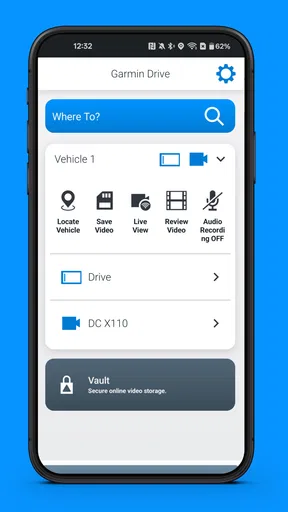
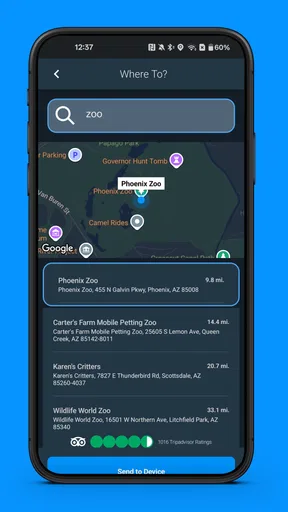
Garmin Drive™ is a navigation and travel companion app designed to work with compatible Garmin car navigation devices. After pairing your phone through Bluetooth, it can provide connected services such as live traffic information, weather updates, parking information, fuel prices, and other travel data. The exact features available depend on your Garmin device, smartphone, location, and active Garmin services.
Is Garmin Drive™ free to download and use?
The Garmin Drive™ app can generally be downloaded without an upfront charge from the Google Play Store or Apple App Store. However, some connected features may require a compatible Garmin navigator, a supported smartphone, mobile data, Bluetooth access, or separate subscriptions and paid services. Before relying on live traffic, weather, or other online tools, check the current terms and availability in your country.
Which phones and Garmin devices are compatible with the app?
Compatibility depends on both your phone’s operating system and the Garmin navigator model you own. The app is intended for supported Android and iPhone devices with Bluetooth, internet access, and the required permissions enabled. Not every Garmin product supports every feature, so it is best to confirm your navigator’s compatibility on Garmin’s official support page before downloading or purchasing additional hardware.
Does Garmin Drive™ provide navigation without an internet connection?
Garmin Drive™ mainly connects your smartphone with a compatible Garmin navigation device rather than replacing every function of a dedicated navigator. Route guidance and maps are typically handled by the Garmin device, while many live services require an internet connection through your phone. Offline availability therefore depends on the paired navigator, installed maps, and the specific feature you want to use.
What permissions and phone connections does Garmin Drive™ require?
To provide its connected features, Garmin Drive™ may request access to Bluetooth, location, notifications, mobile data, and other phone functions. Bluetooth is needed to communicate with a compatible Garmin device, while location and internet access support travel information and live services. Some features may work less reliably if battery-saving settings, background restrictions, or denied permissions prevent the app from operating continuously.
